Showing posts with label Digital Narratives. Show all posts

Tuesday, September 23, 2025

Higher Order Thinking?


Happy New Year! I don't know about everyone else, but my school is pushing Rigor, with higher order thinking questioning.

This is what we were doing last year at this time. I thought my students were doing great. They were reading, writing, and finally could color! Got to have color.

Now I am rethinking what my students should be doing at this time of the year. They are mostly still 5 and 6 years old. They love school and learning - but am I pushing them to the higher level of learning. I am looking at the questions that go along with the Bloom's Task Wheel that everyone in my school has. 

I need to get to the top of the wheel (pyramid) more, but with little Ks who are just now beginning to APPLY the knowledge they have learned, it might be more difficult than someone looking in might think.

How do you get your Ks to climb to the top of the Bloom's chart? I would love some feedback on this.

Friday, July 22, 2022

The Vocabulary Question Cube

I was teaching 4th and 5th AIG students when we made this little video. It was Quicktime, but not sure all computers can view it now. I can view it on my Mac, but not on my PC.
The Vocabulary Cube is a great way to have Word Study Activities. I used Notebooks and modeled how to use a ruler to make tabs for 'interactive' notebooks. I have included a study guide with my updated Vocabulary Cube packet on TPT, also a Vocabulary card for teachers. I just had students write them on index cards or a sheet of paper.

Read the post below to get some ideas that you can use in your classroom for Voc Study.


I have so much fun with my students when I put an iPad in their hands! They are actually very good at anything to do with Technology. This is great since the Common Core Standards have interacting with technology as a major strand.  I love taking pictures, but my students are the best when it comes to putting their thinking into power points and videos. This is a lesson using the Vocabulary Question Cube. I let them video themselves playing the game. We can spend three to five days on a lesson with everything that is involved.


This is a quicktime video made by 4th grade students. They are on the carpet, with their words and finished cubes. Now they roll the cube and ask each other questions using the words they wrote and defined. Because these are new words, this gives them more practice using the words in sentences and just saying the words. 


I used one of the products I have on my Teachers Pay Teachers Store, the Vocabulary Question Cube. This product is aligned with the CCSS ELA L.3.4d, L.4.4c, L.5.4c.
Vocabulary Question Cube - Comprehension 
I love this little comprehension, question game and my students love it also. The first thing I did was give them a passage (4th grade) or text (The Odyssey, 5th grade.) In 4th I wanted them to practice some of the "testlets" with questions. Mostly these are so boring for students, but this is how they are tested on the EOG so they need to practice! Why not make it fun!
5th Grade with Odyssey and Workbook.

5th Grade Looking Up Vocabulary Words or New Words!
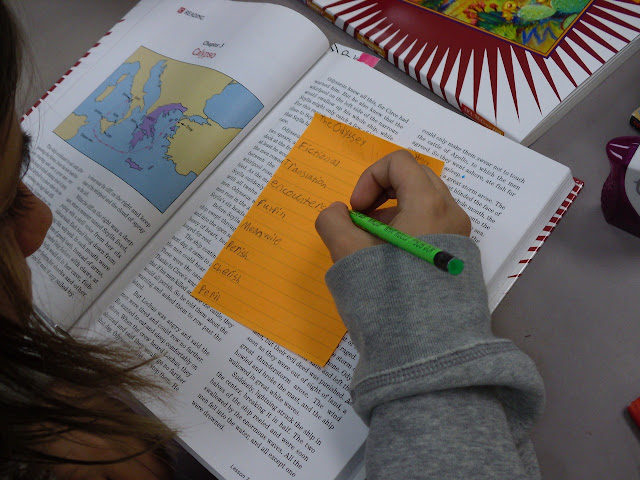
I gave each student an orange post-it note so they could write down 6-8 words while reading that they thought were interesting or that maybe they didn't really know the meaning. Each student had a dictionary so they didn't have to wait for someone else to finish and they could look the word up immediately. Yes, I still use workbooks when I can, I just add a little fun to them!
4th Grade Reading Passages.
4th grader using highlighter.
My 4th grade students needed practice finding the main idea, inference, supporting details and other elements of text. I found these great comprehension books that are common core aligned. Notice that I write notes to my students before copying so they know exactly what they will be doing with the packets. We go over our answers at the end and students make corrections and we discuss WHY the answer is right. I don't have them put Xs on the ones they have wrong, they just erase and put the right one after we discuss it. I encourage my students to voice their opinions and why they thought their answer was right. Sometimes they make very good points and they really should get some credit! With only 3 or 4 questions per passage, it doesn't take long and my students get to discuss the reasoning behind the questions.
4th grade - after finding the words, they glue the I Can statement in their notebooks, and write the word, definition, illustration, sentence and part of speech. We call these notebooks our Vocabulary Word Notebooks. I have used this for years and love them. Nothing like color to keep students interested.
4th grade - You can see the I Can Statement better in this picture. This student loves to illustrate her words! Notice she also has the CCSS Standard in the upper left hand corner.

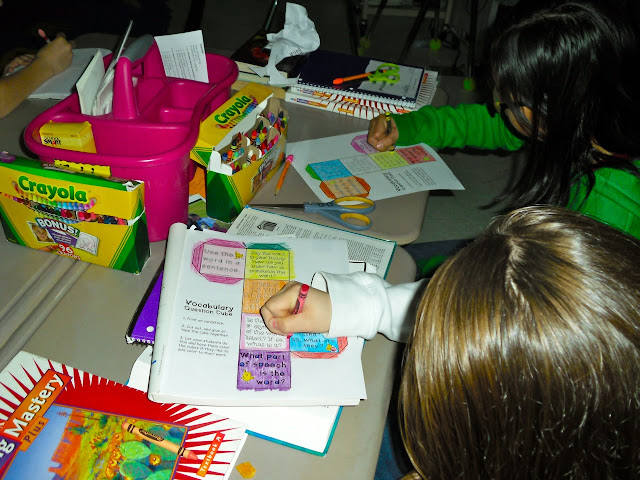
Some students take great pains in coloring their cubes!

The last day we use the Vocabulary Question Cubes. We have to make them about 3 times a year since they are paper and get messy after being used so many times. After about the 3rd time, (you can see from the picture above,) students really get creative in their coloring!
They might be discussing their words or the story while coloring, but they have to keep their discussion on literacy. Sometimes I will put out recorders on the tables to make sure they follow this.
Finished product and ready to play!

You do not have to "play" a game with these cubes. They can be used as an exit ticket at the end of a class. I have also had students use these independently with whisper phones so they can hear themselves say the word and see if they remember the definition. These are great for buddies to use during literacy centers. Let me know any ideas you have for how these can be used!

Thank you for reading my blog! Please join my blog by clicking on the "join" button.
You will be asked your email address and verify that you want to join. That's it! Also, if you follow by email, you will receive an email when I make a new blog post. To do this just go to the "Follow By Email" button and put in your email. Let me know when you do this so I can also do the same for your blog!


<a href="http://www.bloglovin.com/blog/5737697/?claim=hq2sq99d7zk">Follow my blog with Bloglovin</a>


Wednesday, November 13, 2013

Technology In Our Kindergarten Classroom


My students seem to learn best with technology, color, and interaction. I guess it has always been that way, except now technology is more high-tech.


My Ks are using the little Chromebooks I wrote a grant for last year. Of course at that time I didn't know I would be using them with Ks! I was uncertain if they could use them without a mouse, but they went for it immediately and all three are using Starfall. If you have other websites that are easy for Ks to get around in, please leave a comment.


This is actually going to be my writing center. I have a big ole Teacher Desk that is taking up prime property in my room. This was moved out yesterday so I now have room! These two Chromebooks are now in my little listening center so this is my writing area. My room is actually a mess right now and I can't wait to straighten it out this week. (We had 27 students and just split the classrooms so I have way too much stuff.)

This is my new assistant who is actually a certified teacher. She is showing students how to use the Smart Table. They love this! I can't wait to find time to make some activities on this. We do not have a Smart Board but I was able to get this from the EC Dept.

These pictures are our Cut N Paste Center. They rainbow trace their names and then cut the letters out to build their names. Turns out so cute. I wish I could figure out how to put this in an interactive pdf file so everyone could use this. Any ideas?

The Cut n Paste Center is one of their favorites.

What are some of your students favorite centers?

Today we plan on doing this center. This should be an ongoing center from now on until these sight words are mastered.


I only have 5 girls in my room, so while this will appeal to them because they love to make things and all of my girls play some type of sport, my boys will especially love the graphics.

Thanks for visiting! Pam

Saturday, March 2, 2013

NCAGT's 39th Annual Conference - Teaching Digital With Bloom's


I had a GREAT time at the NCAGT's Conference in Winston-Salem. The theme this year was "Gifted Education: Kick it UP a Notch!'
Guess what the logo was... Good ole Texas Pete.
Cute isn't it! We even received a small bottle with our conference bags.

There is a lot to share. Today though I will just share the workshops I attended. I went through the program guide and picked my favorites, mostly Digital Learning. Many of my teaching buds will not be surprised by that! 

I have an online class on Edmodo that is going great. My students are clamoring for more work. This work is very detailed and involves a lot of writing, and they are still wanting more! Mainly because it is digital. Something they relate to and can make a connection to immediately. More on that later!


This pyramid says it all when wanting to use digital media with your lessons. See how many you are already doing in your classroom.


The digital classes I selected were all centered around the Common Core Curriculum and using social media. I am going to start Monday with a lesson I picked up for older students, but will use 4th and 5th grade level books. Digital Retelling and 21st Century Skills by Danielle Sullivan, Union County Public Schools. (I don't have her email, but she did say she would be happy to talk with anyone about what she was doing with digital retelling.) The class was amazing! She used The Raven by Edgar Allen Poe to have small groups interact with a story and produce a digital retelling. I can't use the ppt. she used to explain how she did this, but I will show the one I plan to use for my students as soon as it is finished. 

I have some other anchor type charts from ZaidLearn: A Juicy Collection of Digital Posters.
This one shows some of the Apps that you can use for each of the Revised Bloom's Taxonomy Levels.

This is great to show different websites with learning games and videos.


This is a short post but... I will be back soon with my version of the Digital Retelling and Narratives. If you follow by email, my posts will pop up in your email! The next post will have some digital content from my students! It is easy to do and all levels of learners will be engaged in learning!